
Geofencing Attendance System for Singapore Businesses
Connect employee attendance with designated work locations using Smart GoGo’s location-based attendance workflow.
Smart GoGo helps businesses manage employee clock-in and clock-out activities through a mobile attendance experience with location checking during the attendance process.
What Is Geofencing?
Geofencing creates a virtual boundary around a real-world location. When a device enters, leaves, or remains within that defined area, a location-based system can detect the event and trigger a specific action.
A virtual boundary around a real-world location
A geofence is a virtual perimeter created around a physical location using geographical coordinates such as latitude and longitude.
The boundary can be simple, such as a radius around a store, or it can be customised to match a specific property or operating area.
For example, a 100-metre area around a store, office or other designated location.
A defined area can follow the shape of a property or specific operating zone.
The key idea is simple: a physical location is translated into a digital boundary. Location information can then be used to determine whether a device is inside or outside that defined area and, depending on the system, what should happen next.
Three Steps Behind Geofencing
Geofencing connects a defined geographical area with location information and an action. Here's how the process works from setting the boundary to detecting a location event.
Defining the Boundary
A virtual perimeter is created around a real-world location using geographical coordinates such as latitude and longitude.
The boundary can be a simple radius, such as a 100-metre area around a store, or a custom polygon that follows a property's actual boundary.
Location Tracking
The target device checks its location using available positioning technologies such as GPS, Wi-Fi or cell towers.
This location information allows the geofencing system to determine where the device is in relation to the defined geographical boundary.
Triggering Actions
When a device crosses a defined boundary, the system can detect the event and execute an automated action.
Depending on how the geofencing system is configured, an action may occur when a device enters, exits or remains within a designated zone.
Where Is Geofencing Used?
Geofencing can be used across different industries to connect physical locations with automated digital actions.
Workforce & Site Management
Businesses can use location-based systems to help manage employees and field teams at designated work sites.
Marketing & Retail
Retailers can connect customer locations with location-based promotions and communications.
Smart Home Automation
Smart home systems can respond to people entering or leaving a defined area.
Asset & Fleet Tracking
Location boundaries can help businesses monitor vehicles, equipment and other moving assets.
Security & Personal Safety
Geofenced safe zones can be used to create alerts when a person, pet or other tracked device moves outside a defined area.
Location can become part of your business workflow.
Put Location-Based Attendance Into Practice
Smart GoGo connects employee attendance with designated work locations, helping businesses manage clock-in and clock-out activities through a mobile attendance workflow.
Set Work Location
Define the designated location where employees are expected to carry out their attendance activities.
Employee Opens Smart GoGo
Employees access Smart GoGo from their mobile device when they are ready to record attendance.
Location Is Checked
The employee's location is checked during the attendance process against the designated work area.
Attendance Is Recorded
The attendance process continues based on the configured work-location requirements.
The purpose is simple: connect attendance activity with the employee's designated work location.
Not Near the Office? Smart GoGo Can Let You Know.
Smart GoGo checks the employee's location during the attendance process against the designated work area.
If the employee is not within the required work location, the system can indicate that they are not near the office instead of treating the location as the expected attendance area.
Not Near Office
You are not within the designated work location.
THE SMART GOGO MOBILE EXPERIENCE
A Simple Attendance Experience for Employees
Explore the employee journey, from signing in and verifying access to selecting a project and recording attendance.
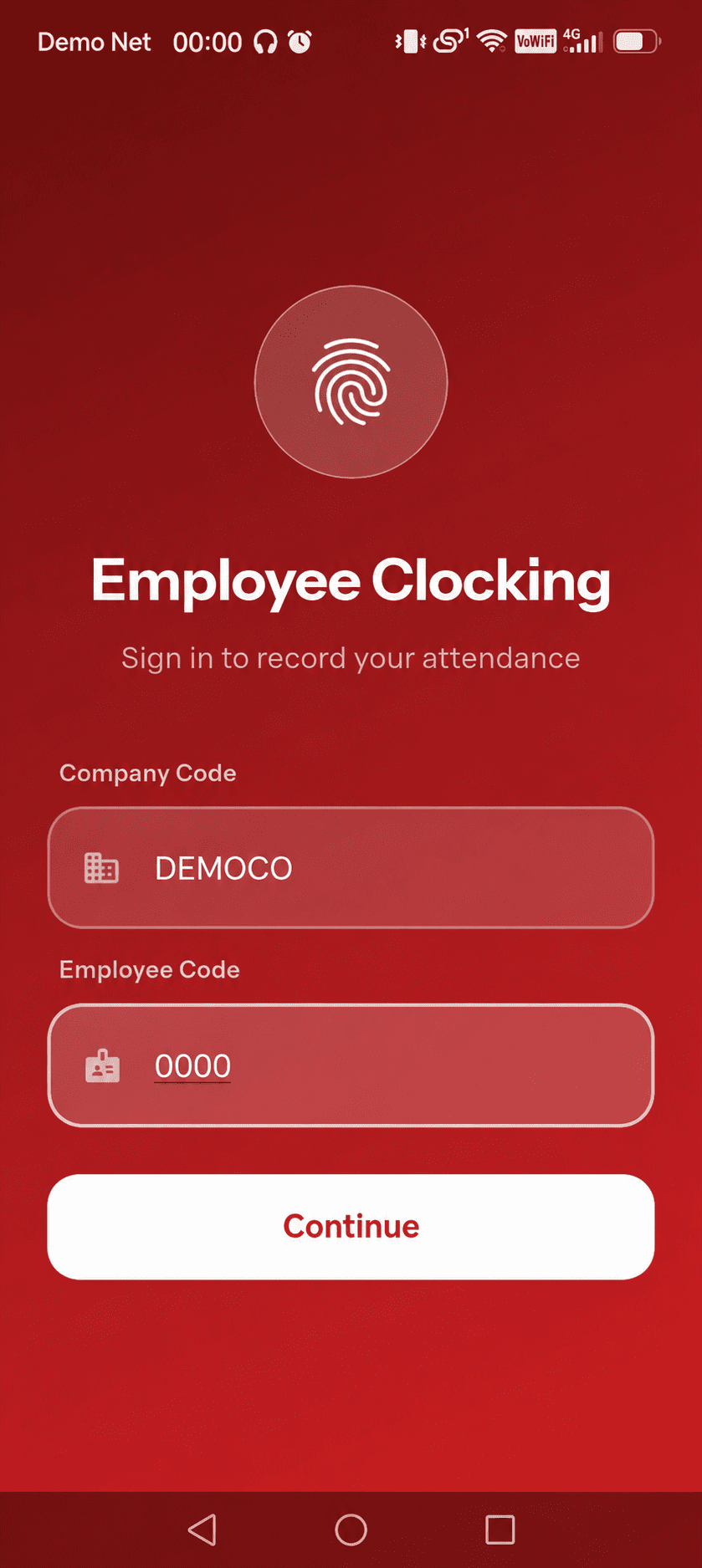
Employee Sign-In
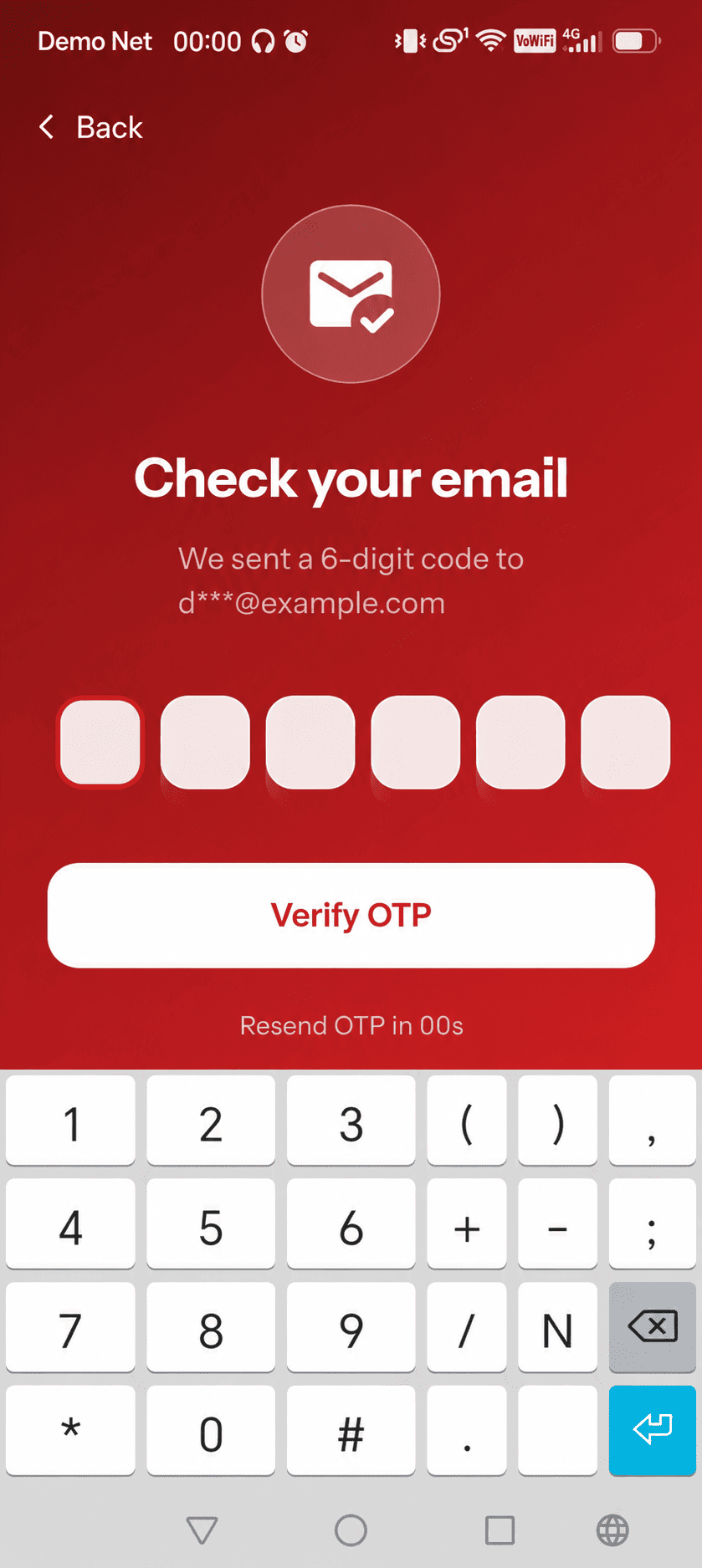
Email OTP Verification
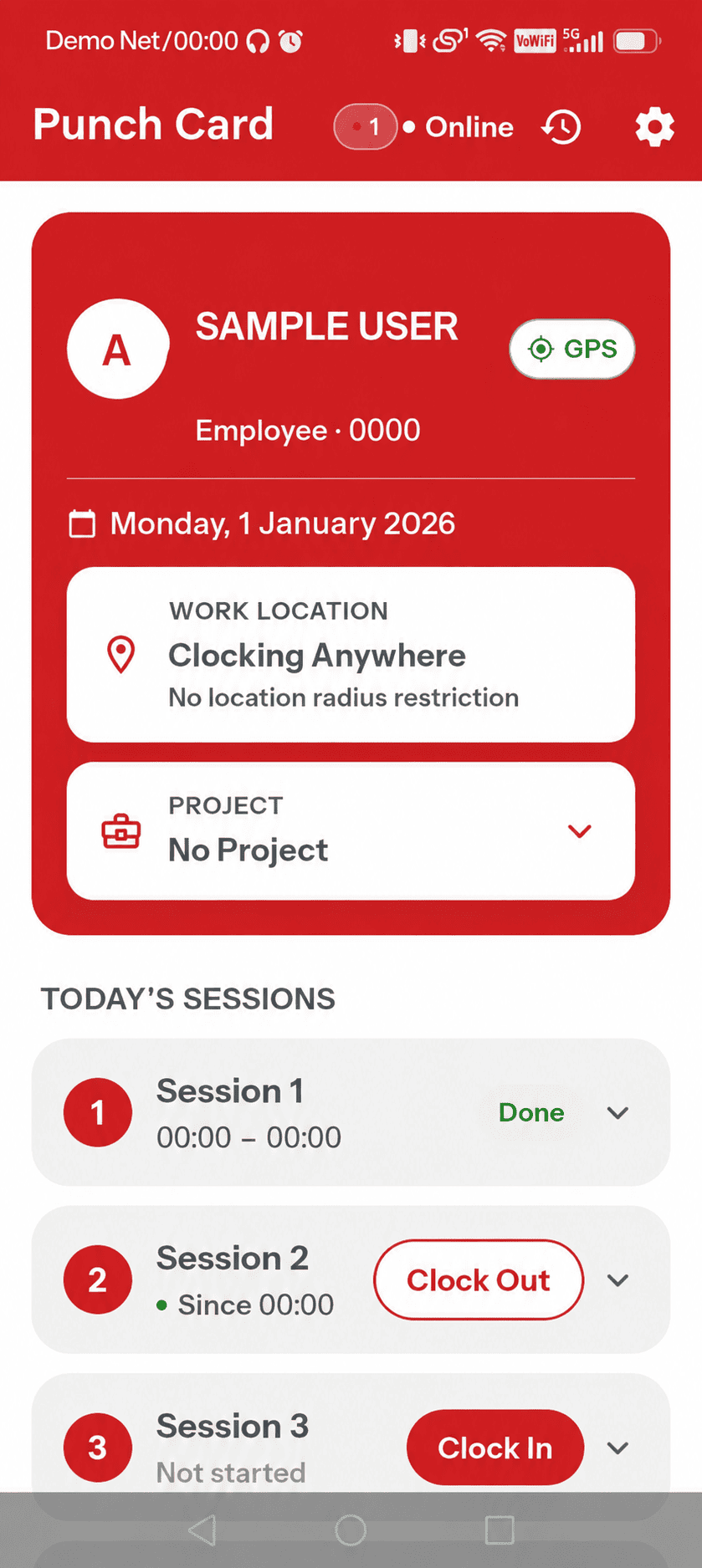
Your Attendance at a Glance
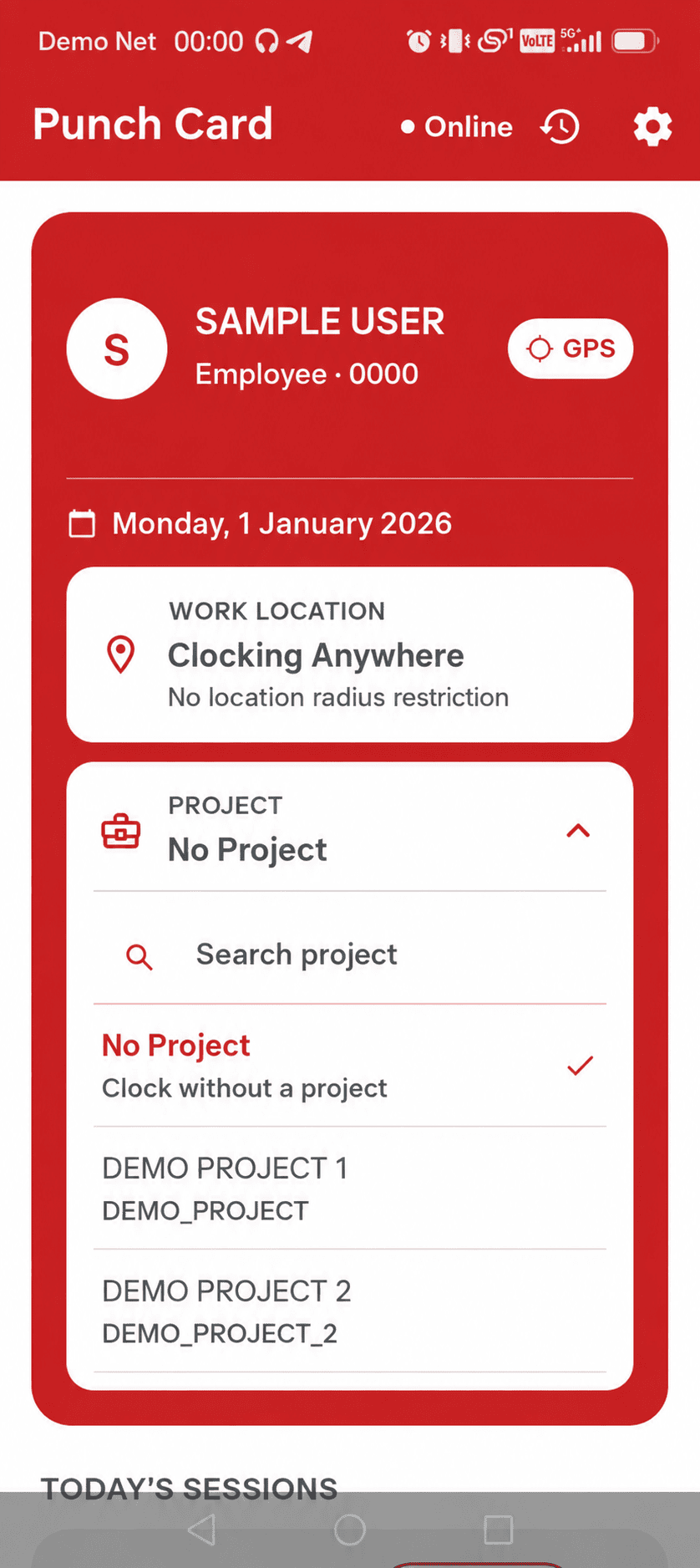
Project Selection
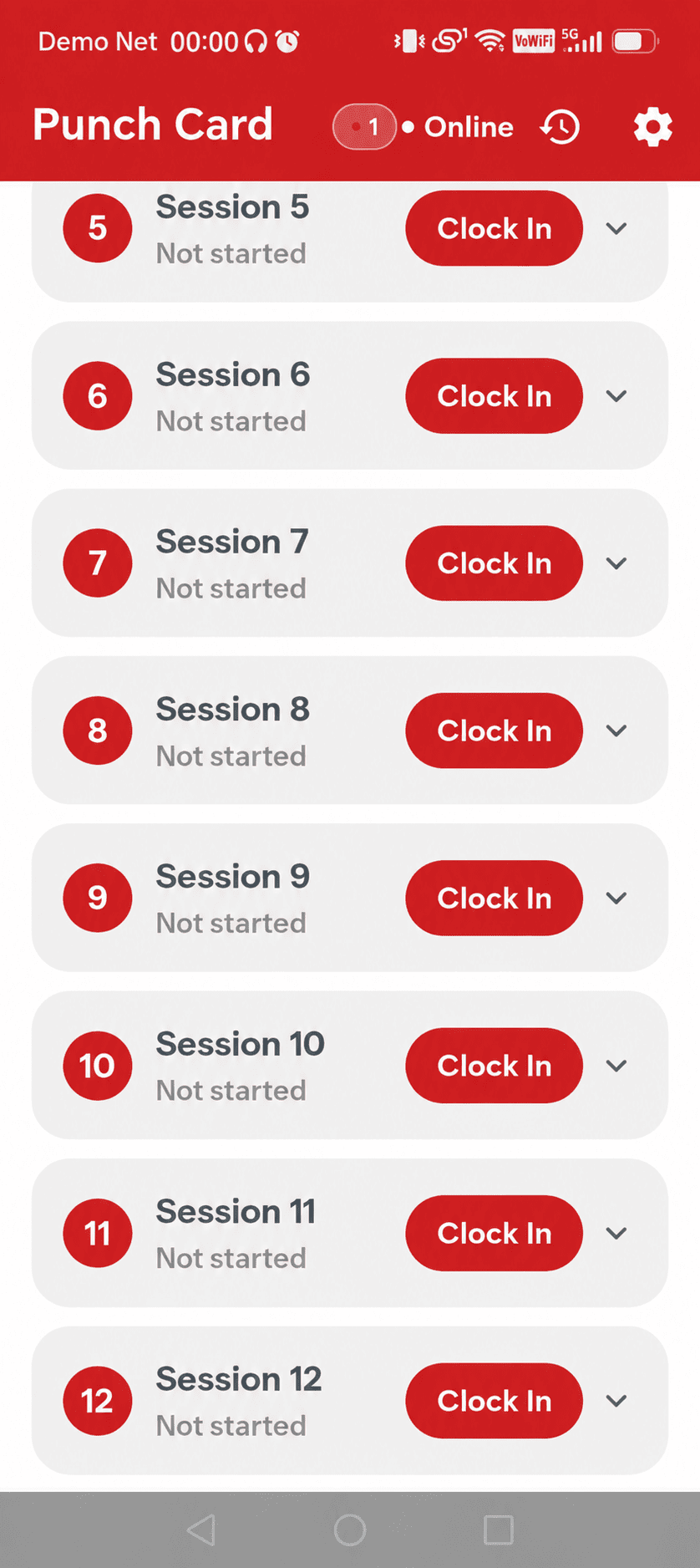
Clock In & Clock Out
Work Location Alert
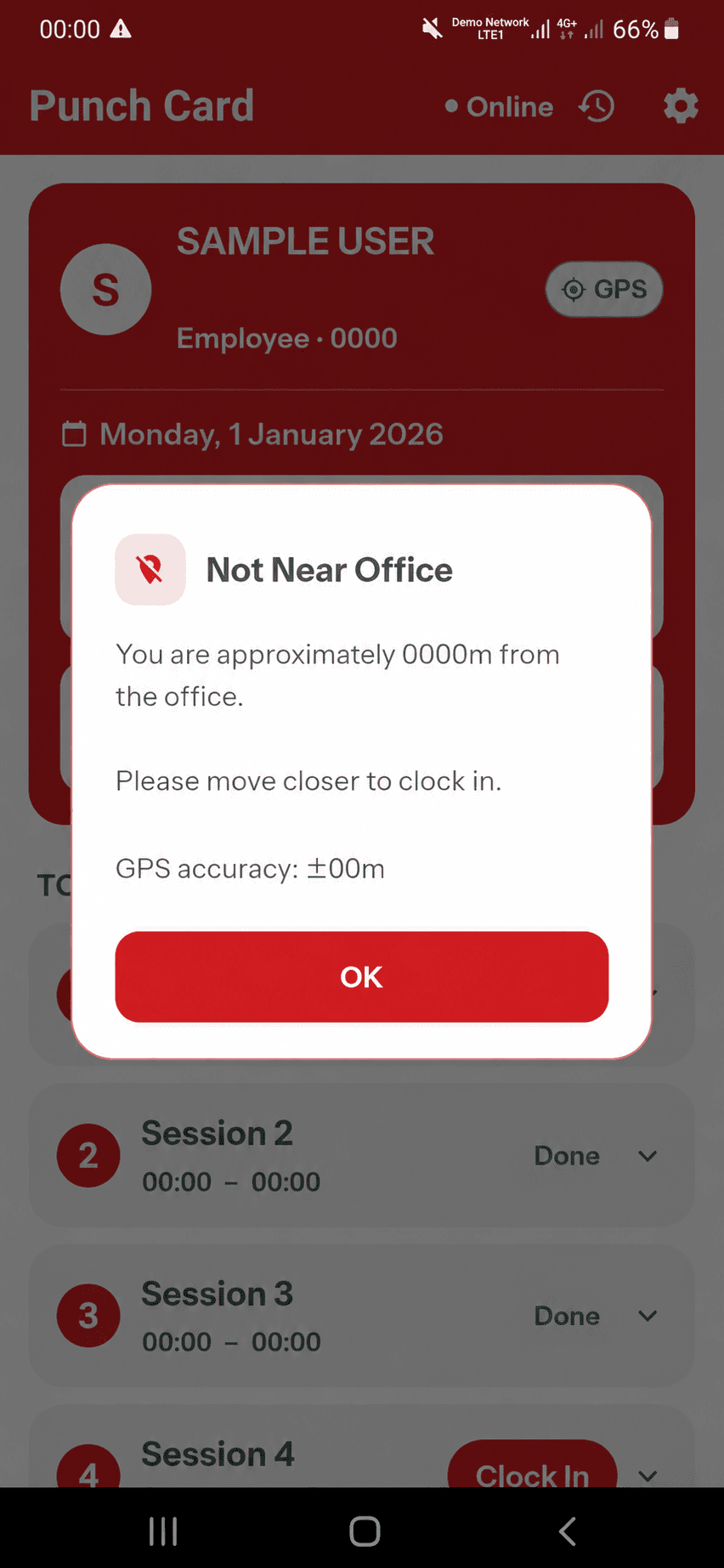
The Punch Card and project selection examples show unrestricted clocking. The location-alert example illustrates a designated work-area restriction.
Everything You Need for Practical Attendance Management
Smart GoGo brings essential attendance, location and employee management features together in one simple mobile experience.
GPS Location-Based Attendance
Check employee location during the attendance process against the designated work area.
Clock In & Clock Out
Give employees a straightforward way to record their attendance from their mobile devices.
Project Selection
Select the relevant project or work assignment when recording attendance.
Email OTP
Add an email verification step to support a more secure employee sign-in experience.
Attendance Sessions
Keep attendance activities organised through recorded employee attendance sessions.
Leave & Claims
Manage employee leave and claim-related activities alongside everyday attendance.
A Simple Attendance Journey for Employees
Smart GoGo keeps the attendance process straightforward, from signing in to recording attendance at the designated work location.
Sign In
Employees access their Smart GoGo account from their mobile device.
Verify With Email OTP
An email OTP can be used as part of the sign-in verification process.
Check Attendance
Employees can view their attendance information at a glance.
Select Project
Choose the relevant project or work assignment when required.
Clock In or Out
Record attendance through the Smart GoGo mobile attendance workflow.
Work Location Check
If the employee is outside the designated area, Smart GoGo can indicate that they are not near the office.
Geofencing Attendance System FAQs
Common questions about geofencing, GPS attendance and Smart GoGo.
What is a geofencing attendance system? +
A geofencing attendance system uses a virtual geographical boundary around a designated location to support location-based attendance checking. This helps businesses connect employee attendance with specific work locations.
How does geofencing work for employee attendance? +
A business defines a work area using geographical coordinates. During the attendance process, the employee's device location can be checked against that designated area before attendance is recorded.
Can Smart GoGo check whether an employee is near the office? +
Yes. Smart GoGo can check the employee's location during the attendance process against the designated work location and indicate when the employee is not near the office.
Is Smart GoGo a GPS attendance app? +
Smart GoGo provides a mobile attendance workflow with GPS and location-based checking to help businesses manage employee clock-in and clock-out activities.
Can geofencing be used for different work locations? +
Geofencing can be applied to different designated areas, such as offices, retail outlets and job sites, depending on the business workflow and attendance requirements.
What other features does Smart GoGo provide? +
Smart GoGo includes features such as clock in and clock out, project selection, Email OTP, attendance sessions, leave and claims, together with location-based attendance checking.
Make Employee Attendance More Location-Aware
Simplify attendance management with Smart GoGo's GPS and location-based attendance workflow for your business.